Run your service company by asking
Bricklane is software for commercial service companies: scheduling, billing and a field app, with an AI assistant built into every screen.
Ask it what you're owed, have it build a report and email it every Monday, or describe a dashboard and get it. It can use every tool in Bricklane, within the permissions of whoever is asking.
- Launch
- November 1, 2026
- AI
- On every screen, from launch
- Built for
- Commercial window cleaning, janitorial, landscaping and pressure washing
- Founder
- Jude Wilson
- Design partner
- One commercial contractor
Ask for anything Bricklane can do
The assistant opens beside any screen and sees what's on it, or takes the whole page. Every screen shares its numbers with it, and every action in Bricklane is a tool it can use, limited to what the person asking is allowed to do. Anything with money in it comes from Bricklane's own tested reports, never from AI arithmetic.
- Which clients are more than 60 days past due, and how much do they owe?
- Send me the aging report every Monday at 7 a.m.
- Build a dashboard of this month's completed jobs by route.
- Why couldn't these five jobs be invoiced?
- Move Harbor Mercantile's Monday jobs to Tuesday for the holiday week.
- Email every client whose contract ends this month about renewing.
What month-end looks like with commercial clients
Commercial clients with many sites pay through an accounts payable department, on terms and against a PO, by check or ACH, and often late.
Every client wants its invoice grouped differently
Someone in your office goes through the month's work at every site and types up each client's invoice the way that client wants it. In Bricklane, the grouping is set once on the client's billing account, by visit, by site or for the whole account, and each billing run drafts the invoices that way from the jobs your techs completed.
Accounts payable rejects invoices without a PO
An invoice that arrives without the client's PO goes back to you, and the payment waits until it's fixed. Bricklane takes the PO from the contract and puts it on every line. If the client's billing account requires a PO, any draft that's missing one is flagged before it's issued.
One check arrives for a stack of invoices
Clients often pay several invoices with a single check, and the amount doesn't always match what's open. Your office enters the check once and applies it across the invoices it covers, short or over, and the aging report shows what's still outstanding.
Some finished work never gets invoiced
A job finished on a paper sheet or mentioned in a text can miss the invoice altogether. In Bricklane, the tech completes each job on their phone at the site, and every completed job goes into the next billing run, which either drafts it or lists it with the reason it couldn't be invoiced.
A month of work at three stores, on one invoice
Harbor Mercantile Group is a demo client with two regions and seven sites. Stores 101, 102 and 103 are billed once a month to Harbor Mercantile Accounts Payable on Net 45. This is their August invoice. Bricklane drafted it from the jobs the techs completed that month, and the office issued it from the billing run.
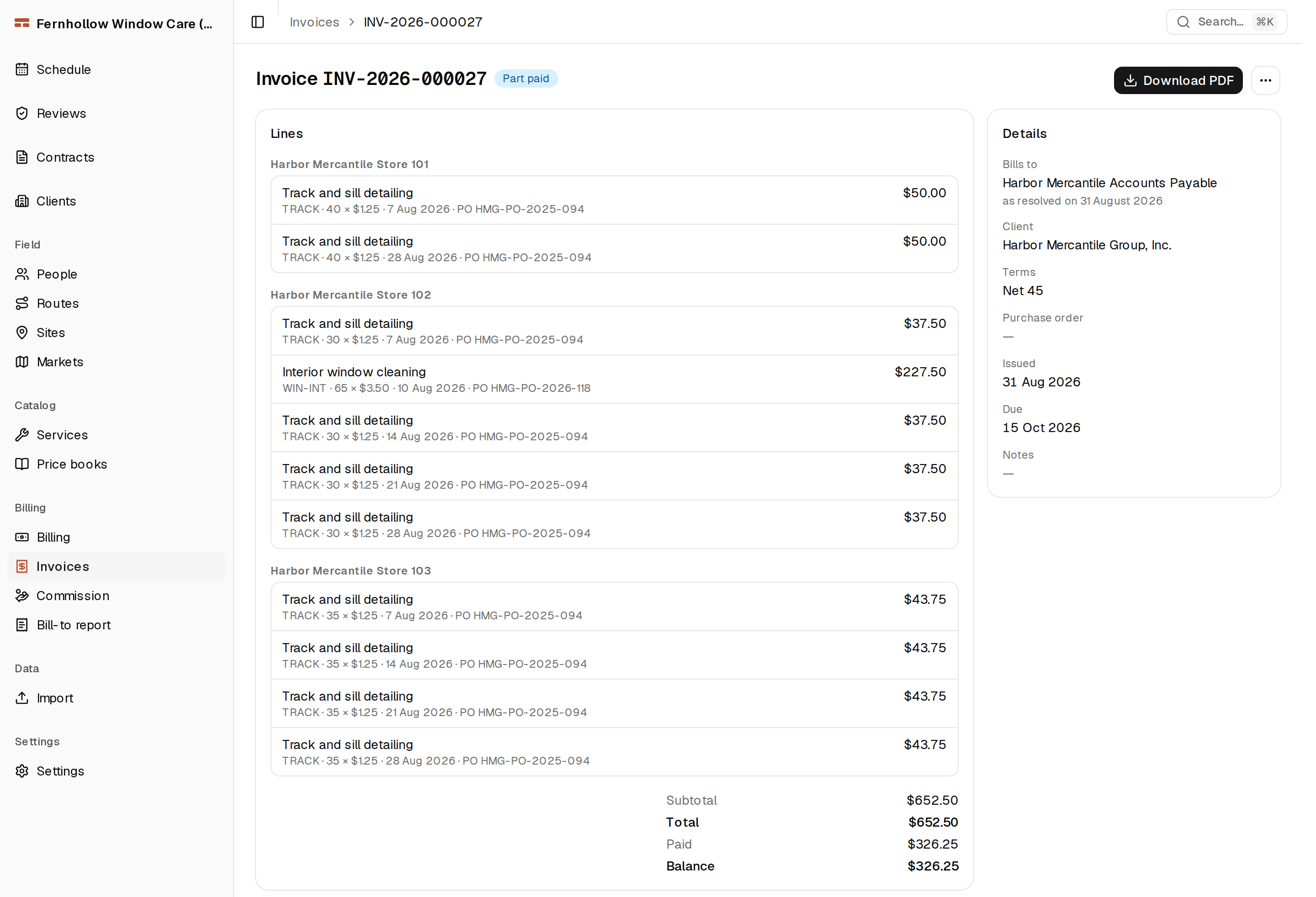
A screen from the office app, with a demo company's data. Each line carries its own PO, so this invoice has two: one for the track and sill detailing, and another for the interior window cleaning at Store 102. The client has paid $326.25 of the $652.50.
Your money and your records
Clients pay you, through your own Stripe account
Card and ACH payments run through a Stripe account in your company's name, so clients pay you, not Bricklane. Bricklane takes no cut of any payment.
Issued invoices are never edited
Once the office issues an invoice, it can't be edited or deleted. A correction is a credit note or a write-off, recorded as a new entry, so the invoice your client received is always the one on file.
Start with your own clients and contracts
Early access is open now. The first companies start with their own clients, sites, price books and contracts already in Bricklane, so their first billing run drafts real invoices.
Early access
Leaving your email commits you to nothing.
Your address is used only for Bricklane's early access and launch news. Privacy notice